


Live Anime Shimeji Pets
4.71.00K Reviews
App Specs
- Version
- 1.2.2
- Updated On
- License
- Free
- Downloads
- 1,000,000+
- Developer
- Hydra Global Ltd.
- Categories
- Personalization
- Platform
- Android
Screenshots
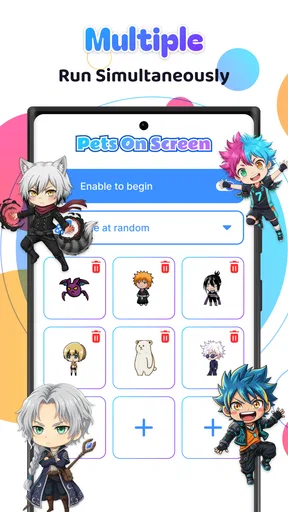
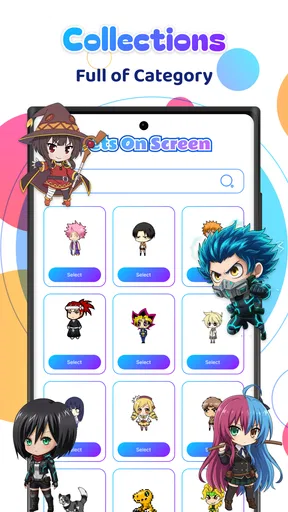
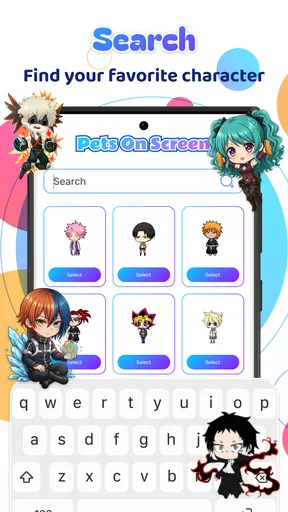
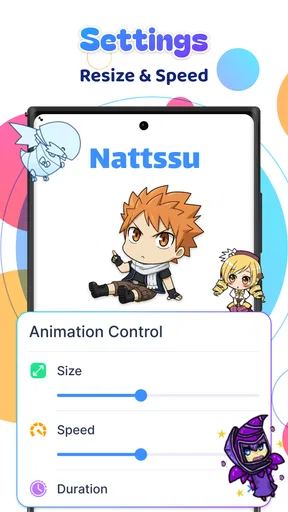
 Analysis by AppCompare
When I set up Live Anime Shimeji Pets, I was looking for a small change to my phone rather than a new game or a full theme overhaul. That distinction matters: this is a personalization app built around animated characters that share space with the screen you already use. The appeal is less about accomplishing tasks and more about adding a bit of movement and personality to everyday phone use.
My first impression is that the idea works best when I treat the characters as a light accent, not as the centre of the interface. They can make an otherwise familiar screen feel more playful, but they also occupy visual space while I’m trying to read, tap, or switch between apps. Whether that trade feels worthwhile depends on how much you enjoy having a little animated activity nearby.
Starting with the screen you already have
The app is free to install and is made by Hydra Global Ltd. It sits in the personalization category, and its Everyone age rating makes it broadly approachable. The current version is 1.0.1, with Android 7.0 as the minimum operating system requirement. The listing shows an average rating of 4.5 from around 11,000 ratings, alongside over 500,000 installs, which suggests the concept has found an audience among people who like playful phone customization.
Before adding anything, I’d think about how I use my home screen. If it is packed with widgets and shortcuts, a moving character may feel like one more thing competing for attention. If it is simpler, the animation has room to be charming without turning the screen into visual clutter. That quick check is useful because the app changes the feel of a screen you already rely on; it is not a separate place you visit and then leave behind.
What Exactly is Live Anime Shimeji Pets?
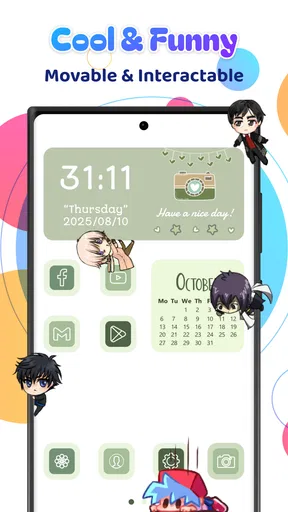
Picture this: tiny, adorable anime characters crawling around your phone screen, interacting with your apps, and just generally being cute. That’s what Live Anime Shimeji Pets is all about. This app offers a delightful collection of shimeji characters that you can choose to accompany you throughout the day. The characters pop up on your screen, and you can drag them around, let them hang out, or even make them perform little actions.
Getting Started with Your Shimeji Friends
Downloading the app is a breeze. Once you’ve got it installed, you open it up and are met with a gallery of potential shimeji friends. You can choose from a selection of characters straight out of your favorite anime or even original designs. The setup is pretty straightforward; you just pick your character, adjust a few settings, and voilà! Your new tiny buddy is ready to explore your screen.
For a smoother first run, I’d start with a single character and leave the rest of the screen unchanged. That gives me a clear sense of whether the animation feels delightful or distracting during ordinary tasks. I’d then try moving the character away from the areas where I tap most, rather than immediately adding more companions. This is a practical way to find a comfortable arrangement before deciding whether extra animation suits the device and my habits.
Worth Reading Before You Choose

EA SPORTS FC Mobile 26 Is a Bigger Football Game, but It Takes Time

Flipboard Shows What News Apps Must Do Beyond the Feed

Switching to Android Auto Means Rethinking Your Driving Routine

Google Calendar Makes a Crowded Week Easier to Manage

Ludo King Makes the Most of the Minutes Between Plans

Baby Panda World Brings Quick Play to Modern Phones, but Its Game Library Feels Busy
Why I’m Hooked
Honestly, I didn’t expect to get so attached to these little guys. But there’s something incredibly charming about seeing a tiny character from "Naruto" or "Attack on Titan" climbing around your apps. They’ve got personality, they’re interactive, and, most importantly, they’re fun. You can even customize their behavior and interactions, which makes it feel like you’re creating a personalized little universe on your phone.
The best everyday use I found is in the little pauses between tasks. I might unlock my phone to check a message, see a character wandering nearby, and get a small moment of amusement without having to open a game or scroll for something entertaining. That makes the app a better fit for people who enjoy background charm than for anyone looking for structured play, a story, or a collection they need to progress through.
Making the animation fit your routine
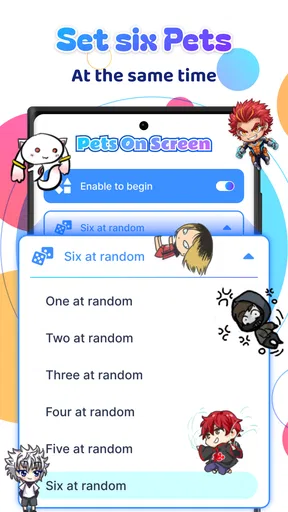
Customization is one of the app’s strong points. You can adjust the number of shimeji on your screen, tweak their size, and even their speed. For those of us who love a personal touch, this app hits the nail on the head.
I’d use those controls as a small tuning process rather than trying to make the screen as busy as possible. A smaller character can leave more room for icons, while slower movement may be less distracting when I’m reading. If I want a livelier look for a few minutes, I can try a different setup, then return to a calmer one for the rest of the day. That distinction makes the app more flexible than a static wallpaper, though it still asks me to decide how much motion I actually want around my apps.
A realistic routine might be to keep one character visible while using the phone casually at home, then reduce the number or pause the visual effect when I need a quiet screen for work, reading, or a video call. I would also check whether the character happens to cover an icon I use often and reposition it if needed. The useful outcome is not a perfect display; it is a setup that adds a little fun without making ordinary tapping awkward.
How it differs from a wallpaper or theme
Compared with a static wallpaper, an animated shimeji adds movement and a sense of presence rather than simply changing the background image. Compared with a full theme, it does not need to replace the whole visual style of the phone to make the screen feel more personal. That narrower focus is a strength if I like my existing layout and only want a playful extra. It is less suitable if my priority is a clean, still screen or a coordinated redesign of icons, menus, and backgrounds.
It also differs from a conventional mobile game: there is no reason to open it expecting levels, objectives, or a long session of play. The enjoyment comes from the character sharing the screen during other activities. I would choose a game if I wanted focused interaction, a wallpaper if I wanted a change with minimal movement, and this app if I wanted a small animated companion to enliven the interface.
When the charm becomes friction
While the app is mostly a joy to use, there are a couple of things to keep in mind. First off, having multiple shimeji on your screen can sometimes slow things down a bit, especially if your device is not the latest model. It’s not a dealbreaker for me, but it’s something to consider if you’re planning to unleash a whole gang of shimeji at once.
Also, the app can be a bit of a battery drainer if you let them run wild for too long. But hey, isn’t a bit of cute chaos worth a slight dip in battery life?
Those trade-offs are why I would test the effect in the way I actually use my phone instead of judging it from a quick glance. If I notice lag, visual obstruction, or faster battery loss, the first adjustment I’d make is reducing the number of characters and keeping the animation modest. If I need the phone to stay especially responsive or conserve power through a long day away from a charger, a static wallpaper is the more sensible choice. The animated look is optional decoration, so there is little reason to keep a busy setup when it stops being fun.
Cost and choosing whether to keep it
The app is free, with optional in-app purchases priced from $2.99 to $14.99 per item. I’d begin with the free experience and decide whether the characters and controls suit my routine before paying for anything. The main question is not whether a moving companion looks cute for a moment, but whether I still enjoy seeing it after the novelty settles and whether it fits how I use the screen day to day.
That also answers who should skip it: anyone who dislikes motion on their home screen, is already sensitive to visual distractions, or wants a carefully coordinated theme rather than a character overlay may be happier with a static customization option. I’d also be cautious about using several characters on a device that already feels sluggish. On the other hand, anime fans who like small personal touches and do not mind a little screen activity are the people most likely to appreciate the idea.
The Verdict
In terms of pure joy and entertainment, Live Anime Shimeji Pets delivers in spades. It’s a fun and unique way to bring a little piece of anime into your daily life, and it’s sure to make you smile every time you see your favorite characters frolicking around your screen. Whether you’re a hardcore anime fan or just someone looking for a bit of fun, this app is definitely worth checking out. Just remember to keep an eye on your battery!
My recommendation is to start modestly, make sure the character does not get in the way of your most-used icons, and judge the experience across a normal day rather than only during setup. With that approach, the app’s strengths are easy to understand: it adds a personal, animated touch without asking me to rebuild the phone’s whole appearance. Its drawbacks are equally straightforward—motion, screen clutter, performance demands, and battery use can outweigh the charm for some people.
Overall, I see it as a cheerful extra rather than an essential phone tool. If you enjoy anime-inspired decoration and want an animated presence during brief everyday pauses, it is worth trying. If you value an uncluttered interface above all else, or need every bit of attention and battery for other tasks, a still wallpaper or a more restrained theme is the better fit.
Pros
- Interactive anime companions enhance your home screen.
- Wide variety of characters to choose from.
- Customizable animations and behaviors.
- Low impact on device performance.
- Regular updates with new features.
Cons
- Some characters require in-app purchases.
- Limited customization for free version.
- May distract from other phone activities.
- Requires internet for certain features.
- Occasional bugs in animations.
FAQs for Live Anime Shimeji Pets
What are Live Anime Shimeji Pets?
Live Anime Shimeji Pets are interactive, animated characters that live on your mobile screen. They can perform various actions, follow your taps, and add a playful element to your phone usage. Users can choose from a variety of anime-themed pets to personalize their device and bring a touch of fun to their daily interactions.
How do I install Live Anime Shimeji Pets on my device?
To install Live Anime Shimeji Pets, visit the app store on your Android or iOS device and search for the app. Download and install it just like any other application. Once installed, open the app and follow the on-screen instructions to set up your shimeji pets and customize their behaviors and appearances.
Do Live Anime Shimeji Pets consume a lot of battery?
Live Anime Shimeji Pets are designed to be energy efficient, but like any app that runs continuously in the background, they will consume some battery power. The impact on battery life varies depending on the number of pets you have active and how often they interact. Users can manage settings to optimize battery usage.
Can I customize the appearance and behavior of my shimeji pets?
Yes, Live Anime Shimeji Pets offer a range of customization options. You can choose different characters, outfits, and animations to suit your preferences. Additionally, the app allows you to adjust how the pets interact with your screen and each other, providing a personalized experience tailored to your liking.
Are there any in-app purchases in Live Anime Shimeji Pets?
Live Anime Shimeji Pets is free to download, but it does offer in-app purchases. These purchases can unlock additional characters, outfits, and special features. While the basic functionalities are available for free, users who want to expand their collection and customize more deeply may choose to make in-app purchases.


